




Software for Outer Diameter Irregularity Detectors
TMSCOM1
Ver1.00
- TMS-01
Overview
Configures the [TMS-01] and displays and saves measurement data. Measurement data is saved in CSV format.
Installation
- Extract the files to any folder, then run Setup.exe
- Then follow the installer instructions to complete the installation
Uninstallation
- Uninstall it in the usual way for removing applications on your PC
- The software does not use the registry
Screen Guide
Main Screen
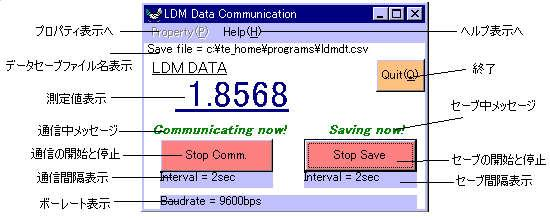
- Shows where the file will be saved. You can change it on the Properties screen.
- Starts communication. Communication ends automatically when there is no more irregularity data detected by the TMS-01.
- Closes the program.
- Opens the Properties screen.
- Switches the display between English and Japanese.
- Opens the Settings screen, where you can exchange TMS-01 settings.
- Shows the help.
- Shows the irregularity data received through communication.
Properties Screen
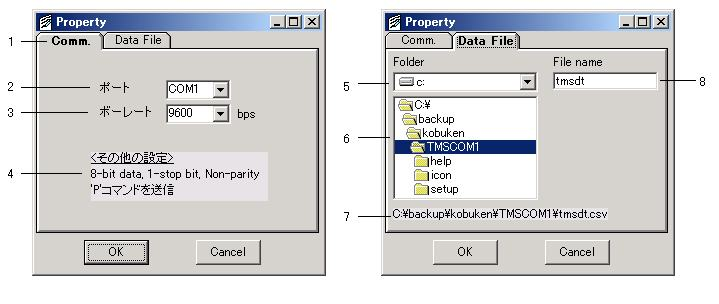
- The Communication Properties tab and the Data File Properties tab.
- Select the port to use.
- Baud rate setting. Set the same baud rate as the TMS-01.
- Shows fixed settings.
- Select the drive where the received irregularity data is saved.
- Select the folder where the received irregularity data is saved.
- Shows where the received irregularity data is saved.
- Set the file name for the received irregularity data.
The ".csv" extension is added automatically, so do not enter it here.
Settings Screen
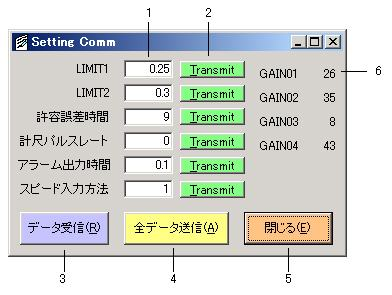
- Shows the received data.
Enter data here when sending it. - Sends the setting for each button one at a time.
- Receives the settings stored in the TMS-01.
- Sends all displayed data and changes the TMS-01 settings.
- Closes this screen.
- Shows the gain value for each axis received from the TMS-01.
This data cannot be sent.
Saved Data
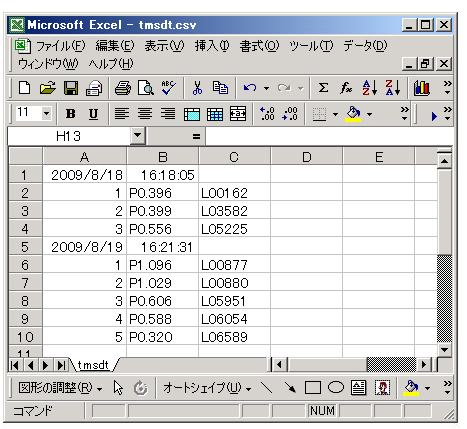
The saved data consists of the date and time when the start-communication button was pressed, the size of each irregularity, and the length-counter reading at the point where it was detected.