




Software for Counting Event Printers
ADMSGCHG1
Ver1.02
- AD-50
Overview
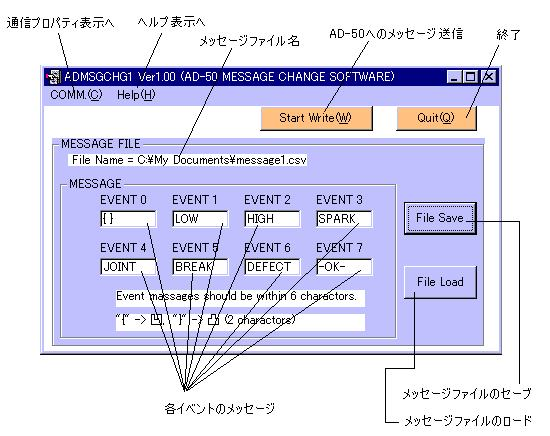
Enter event messages on screen and send them all at once to the AD-50 via RS-232C communication. Messages are saved in CSV format for reuse.
Installation
- Extract the files to any folder, then run setup.exe
- Then follow the installer instructions to complete the installation
Uninstallation
- Uninstall it in the usual way for removing applications on your PC
Screen Guide
Main Screen
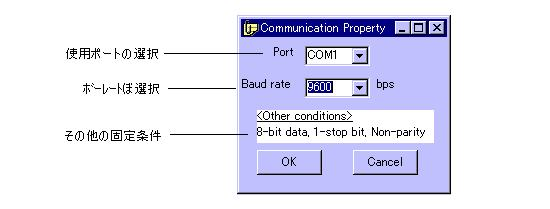
Communication Properties Screen
Version History
- Ver 1.00 → Ver 1.01
Fixed a bug when entering the neck and lump characters (凹 / 凸) - Ver 1.01 → Ver 1.02
Fixed communication errors on PCs with fast CPU clocks
Extended the selectable communication ports from COM5 to COM7
Verified on Windows 7 (32-bit) / Vista (32-bit) / XP (32-bit)
Important Notes
- Messages can be up to 6 single-byte characters. A single-byte opening brace "{" is printed as 凹 (neck) and a closing brace "}" as 凸 (lump); each counts as two characters.
- Messages are sent via RS-232C for events 0 to 7 all at once; you cannot send messages for specific events only.