




Software for Outer Diameter Control Units
DACCOM1
Ver1.03
- ADAC-77
- DAC+88
Overview
Saves and restores all settings of the automatic start-up control unit at once, with three functions: read, overwrite, and verify all settings. Settings data is saved in CSV format.
Installation
- Extract the files to any folder, then run setup.exe
- Then follow the installer instructions to complete the installation
Uninstallation
- Uninstall it in the usual way for removing applications on your PC
Screen Guide
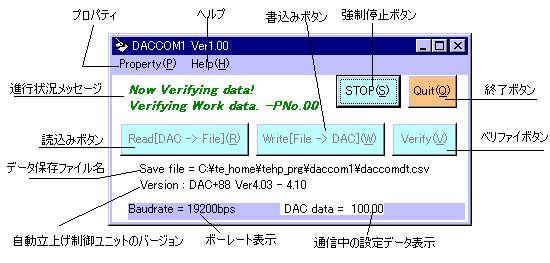
Main Screen
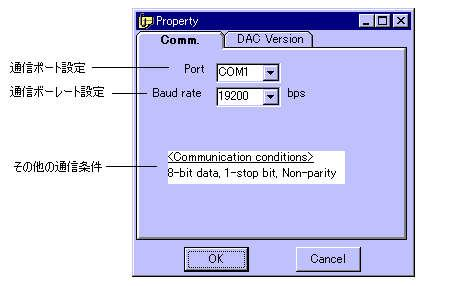
Communication Properties Screen
Version Properties Screen for the Automatic Start-Up Control Unit
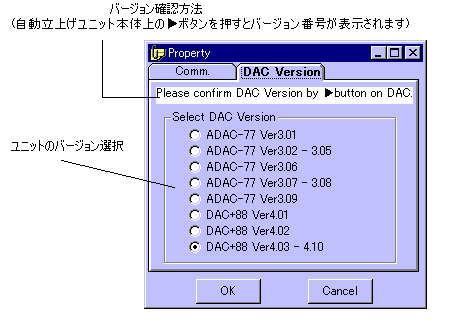
Settings data cannot be read or written between units of different versions.
Saved Data
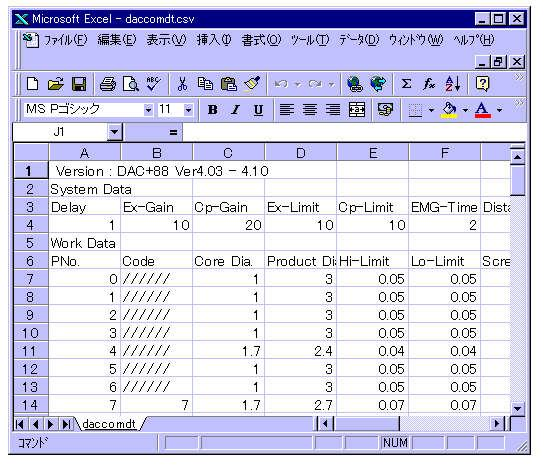
The figure shows an example of the settings data file
("daccomdt.csv") opened in Excel.