




Software for Laser Outer Diameter Gauges
LDMCOM1
Ver1.00
- LDM-110
- LDM-110EX
- LDM-210
Overview
Displays and saves measured values. On the [LDM-110EX], it also reads the value displayed at power-on into the PC.
Installation
- Extract the files to any folder, then run setup.exe
- Then follow the installer instructions to complete the installation
Uninstallation
- Uninstall it in the usual way for removing applications on your PC
- Some files, such as settings and data files, remain after uninstallation
Screen Guide
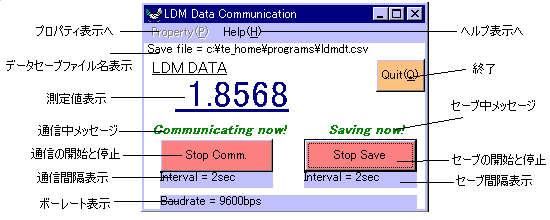
Main Screen
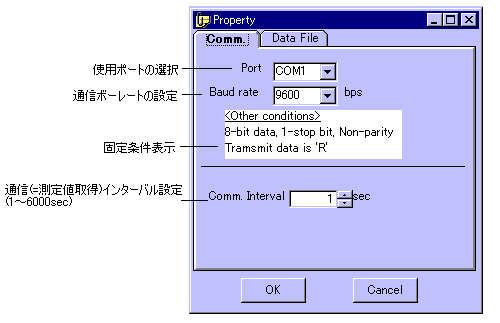
Communication Properties Screen
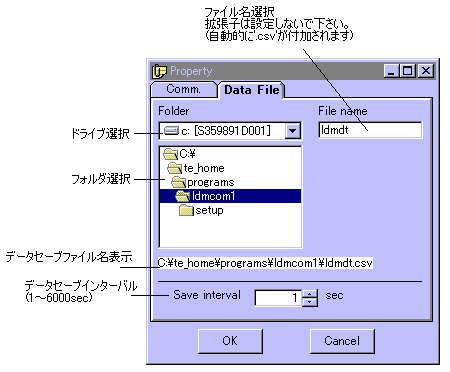
Data File Properties Screen
Saved Data
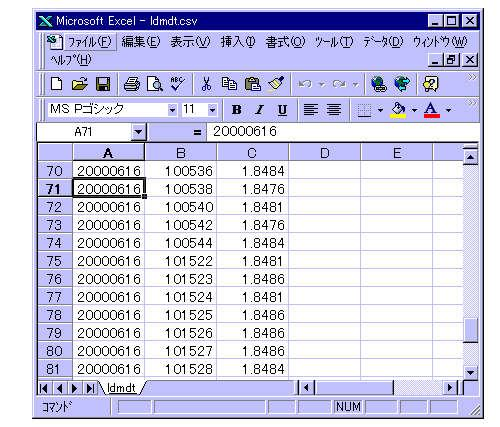
The saved data consists of the measured value and the date and time at which it was saved.
The figure shows an example of saved data opened in Excel.
For example, row 71 shows that the measured value 1.8476 (column C) was saved on June 16, 2000 (column A) at 10:05:38 (column B).